
-
01 Read the rules
Never get burned by the fine print.
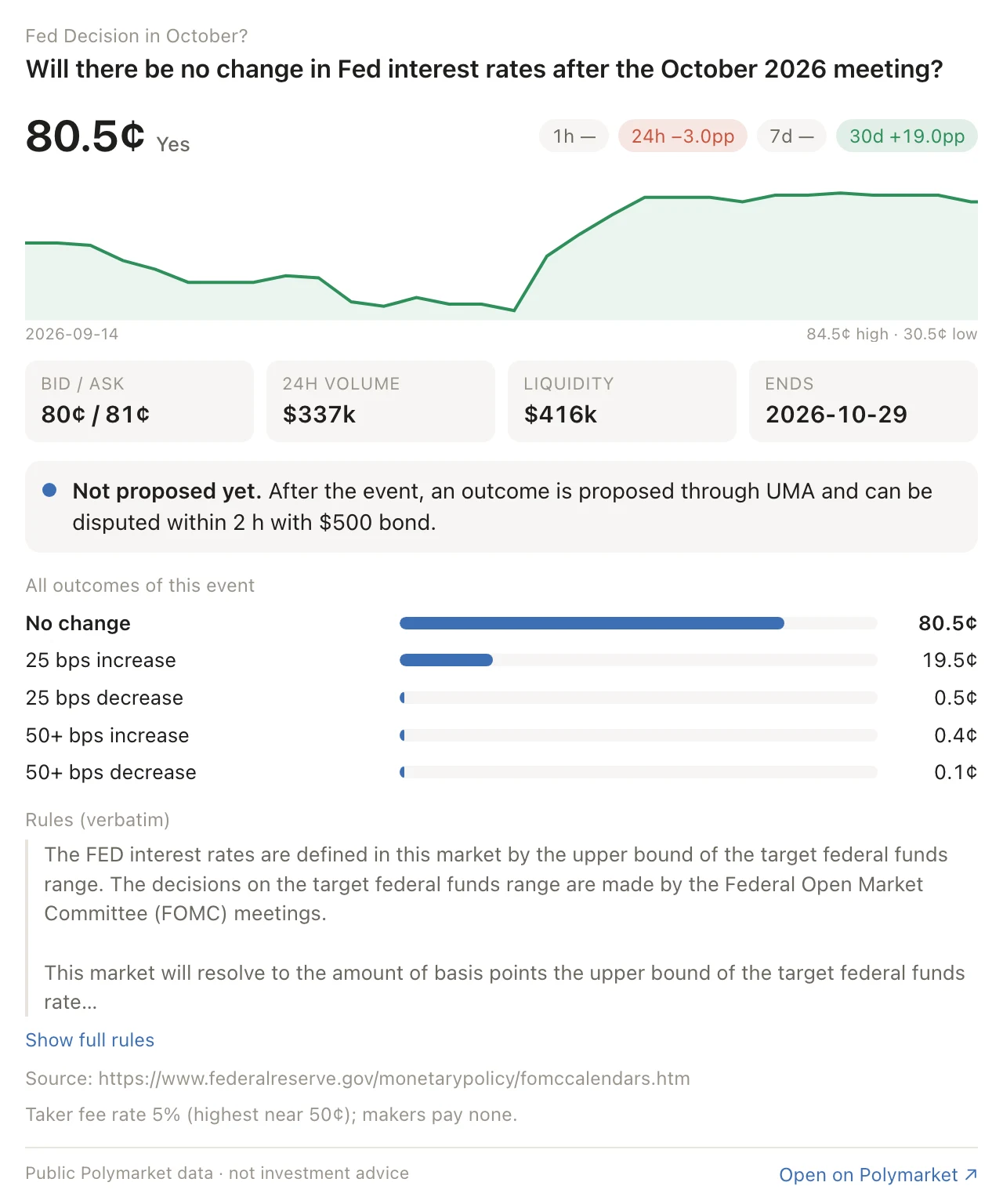
You“Before I buy Yes on the Fed market: what actually decides it? The title isn't the rules, right?”
You get the rules word for word, the source that settles it, and where resolution stands right now. Catch the clause that would have cost you before it does.
- The rules, word for word
- The source that settles it
- Proposed, disputed or still open
-
02 Price a trade
Know your price before you click buy.
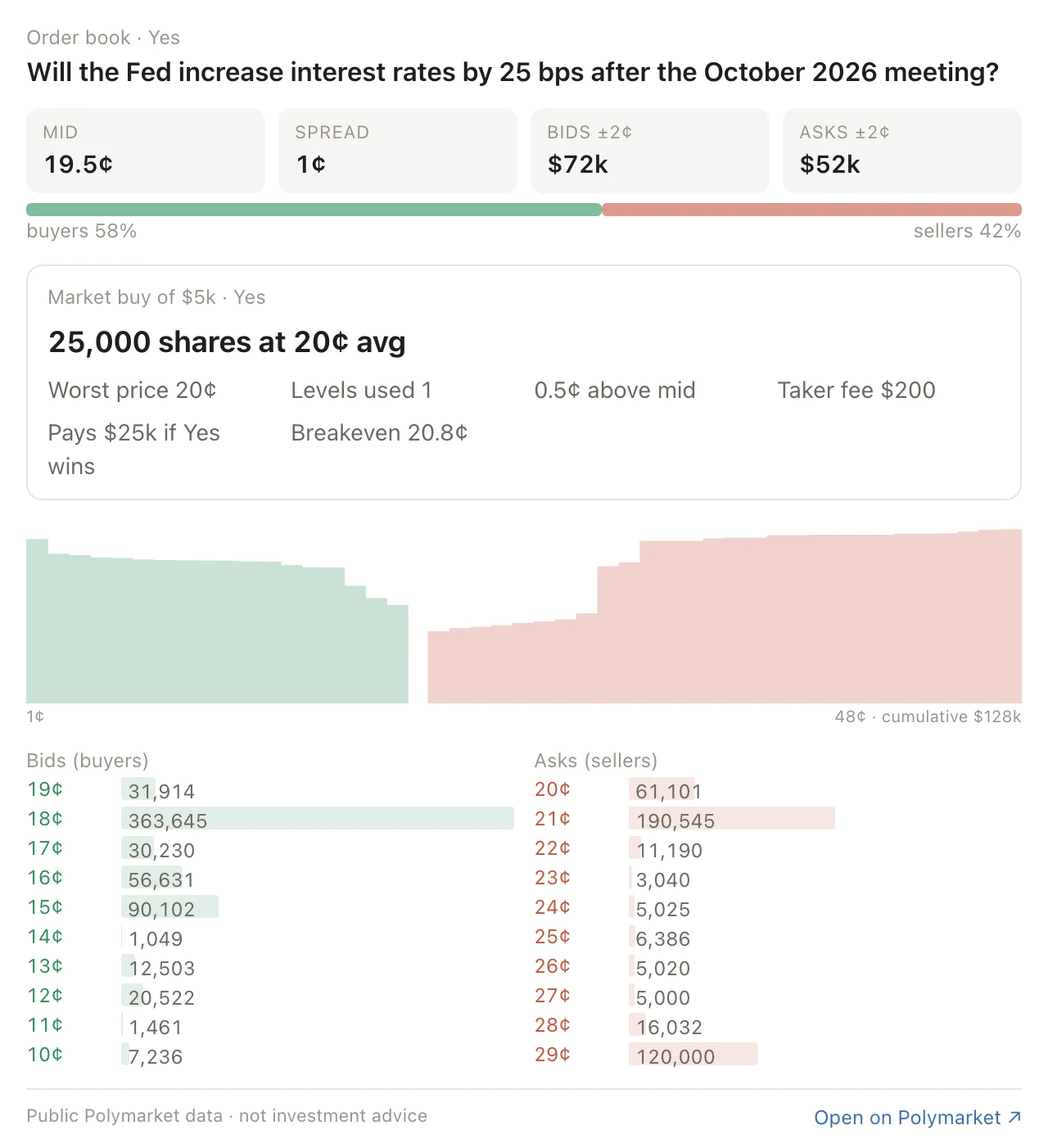
You“If I throw $5k at the second favourite, how far does the price run on me, fees included?”
Your order is walked through the live book level by level, so the fill you see is the fill you get. No more surprise prices.
- Shares and average price for your size
- The taker fee, in dollars
- The odds you need just to break even
-
03 Follow the money
See the money before the move.
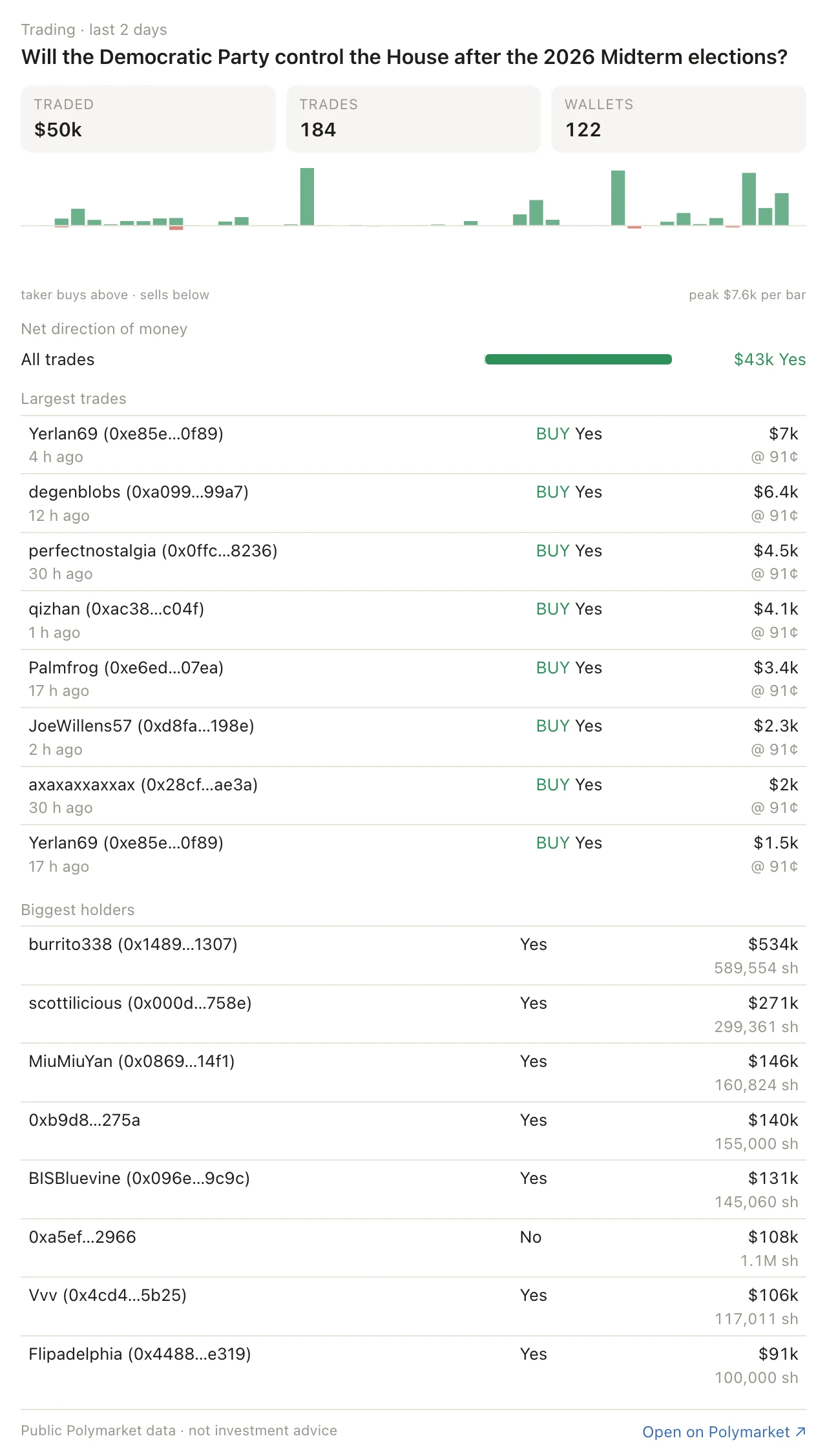
You“Someone's been piling into the House market. Who is it, and who's sitting on the biggest positions?”
See which way the money is really flowing and whose it is. Leave the market out to watch every whale trade on Polymarket at once.
- Net direction of money, per outcome
- The biggest trades, with usernames
- Who holds the most, and how much
-
04 Find what moved
Catch what moved while you slept.
You“What blew up on Polymarket overnight? Skip the sports games.”
The biggest repricings of the last hour, day, week or month, with the noise already gone. Then ask who moved it.
- Last hour, day, week or month
- Settling markets and live games filtered out
- One question away from who did it
Biggest moves, live right now
- Loading live data…
-
05 Size up a trader
Find out if that whale is any good.
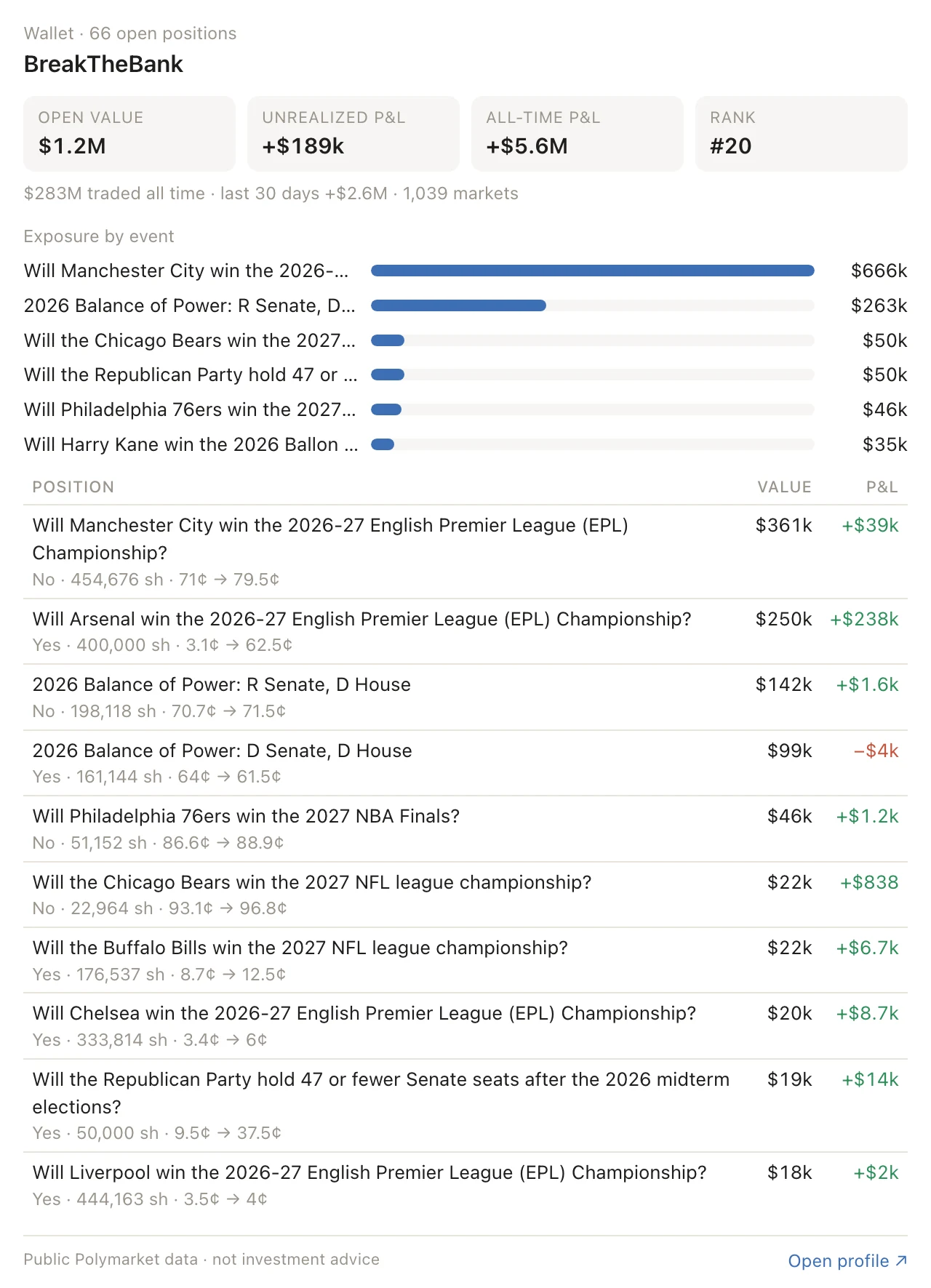
You“Who's printing money this week? Is the top guy actually good, or did he just get lucky?”
Polymarket's top traders by profit or volume in any category, and the full picture on any wallet or username.
- Lifetime and 30-day profit
- Leaderboard rank
- Every open position and what they paid
[ For Polymarket traders ]
Your Polymarket analyst, on call.
Ask about any market and get what decides it, what your order will really cost, and who's moving the price. Before you put a dollar in. Right inside Claude, ChatGPT or your own agent.
YouThinking of putting $5k on a Fed hike in October. What would I actually end up paying?
Live order book · Yes
Will the Fed increase interest rates by 25 bps after the October 2026 meeting?
shares at 20¢ avg
- Above mid
- 0.5¢
- Levels eaten
- 1
- Taker fee
- $200
- Pays off above
- 20.8%
Works in the AI you already use
- Claude
- ChatGPT
- Claude Code
- Cursor
- Hermes
- OpenClaw
- + any MCP client
Polymarket right now
Pulled live via Prediction Market Intelligence MCP
[ What you can ask ]
Ask like a trader. Get answers like an analyst.
Paste a polymarket.com link or just name the market. Here are five questions traders ask every day, and the exact card your AI answers with.


[ The difference ]
Stop trading half‑blind.
[ What's inside ]
Built for the questions traders actually ask.
Read-only by design: it can't place orders, move funds or touch your account. New capabilities ship regularly.
[ Connect ]
Up and running in 30 seconds.
Paste one link into the AI you already use. No account, no API keys, nothing to install.
https://mcp.lacuna.markets/mcp
- In claude.ai or Claude Desktop, open Settings → Connectors.
- Choose Add custom connector and paste the URL. There's no sign-in step.
- Ask about any market. Market, order book, trading and wallet answers render as interactive cards.
claude mcp add --transport http lacuna https://mcp.lacuna.markets/mcp
- In ChatGPT, turn on Developer mode under Settings → Apps & Connectors → Advanced.
- Choose Create, name it Lacuna, paste the URL and set authentication to No authentication.
- Enable it in a chat from the tools menu. Custom connectors need a paid ChatGPT plan.
Add it to ~/.hermes/config.yaml:
mcp_servers:
  lacuna:
    url: "https://mcp.lacuna.markets/mcp"
openclaw mcp add lacuna --url https://mcp.lacuna.markets/mcp --transport streamable-http
Then openclaw mcp doctor lacuna --probe to check it answers.
Cursor, VS Code, Windsurf, LM Studio and most agent frameworks take a remote server in this shape. The transport is Streamable HTTP with no authentication.
{
  "mcpServers": {
    "lacuna": { "url": "https://mcp.lacuna.markets/mcp" }
  }
}
[ Pro, coming soon ]
Your Polymarket desk, watching while you sleep.
Everything above stays free. Pro is for people who trade every day and can't afford to find out late.
- Your wallet, watched. The moment one of your positions moves, a plain-language note on why, with the trades behind it.
- A morning brief. What changed in your markets overnight, what resolves soon, what just got proposed or disputed.
- Early warnings. Unusual money flowing into a market before the price catches up.
- More history, higher limits. For the questions that need more than a day of data.
Get Pro first
Join the early list. You'll be first in when Pro opens, at a founding-member price.
Continue with GoogleBy signing up you agree to the privacy policy.
You're on the list.
Signed in as . You'll be among the first in when Pro opens, at a founding-member price.
[ Questions ]
Short answers.
Is it really free?
Yes. Everything on this page except Pro is free and needs no account. Pro adds monitoring and alerts on top.
Which AI apps does it work with?
Any app that can add an MCP server by link: Claude, Claude Code, ChatGPT (developer mode), Hermes, OpenClaw, Cursor and more. In Claude the answers also show up as interactive cards; elsewhere you get the same numbers as text.
Can it trade for me?
No, on purpose. It only reads public market data. It can't place orders, move funds or connect to your Polymarket account.
How fresh is the data?
Live from Polymarket, cached for seconds to a few minutes. Order books refresh every 10 seconds.
Who is it for?
Individual traders and researchers. Market data belongs to Polymarket and is used under its terms, so Lacuna isn't offered to brokers, funds, trading firms, fintech companies or data resellers, and its data may not be passed on to them. Those firms can license data from Polymarket directly.
What about Kalshi?
Not yet. Kalshi's developer terms limit how its data can be used, so for now it's Polymarket only.
Is this investment advice?
No. It's market data and arithmetic. The calls are yours.
[ Free while you read this ]